


Network-wide ad blocking, no browser extensions required
Pi-hole is a DNS sinkhole that filters ads, trackers, and telemetry at the network level — before they reach any device on your LAN, including phones, smart TVs, and IoT gadgets that can't run a browser extension. Its web dashboard gives you real query logs and per-device stats, and it can double as your own recursive resolver if paired with something like Unbound. If you want the technical rundown before you buy, the official docs cover architecture and setup in detail.
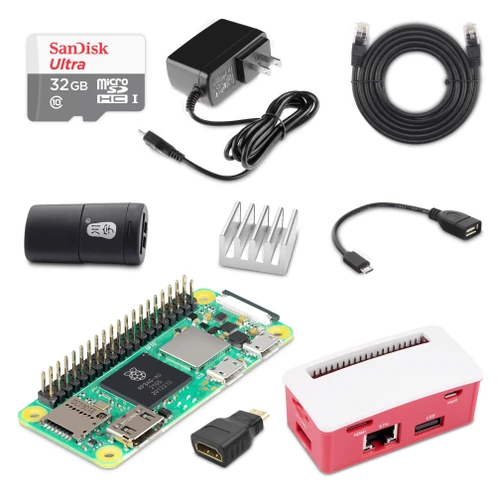
This kit bundles everything you need to get a dedicated, low-power Pi-hole box running in under an hour — including the one thing most Zero-based builds get wrong: reliable wired Ethernet.
Why this hardware setup
The Raspberry Pi Zero 2 W is plenty of CPU for Pi-hole, but the stock board has no Ethernet port, and a DNS server that depends on Wi-Fi takes your whole household offline if the wireless network hiccups. The Waveshare Ethernet/USB HUB BOX solves this: it's a case that breaks out a real RJ45 jack and USB-A ports from the Zero's OTG interface, turning it into a wired, always-on appliance rather than a Wi-Fi-only hobby board.
What's in the box
- Raspberry Pi Zero 2 WH: The board itself — pre-soldered GPIO header, quad-core Cortex-A53 at 1GHz, Wi-Fi/BT for setup or fallback
- Waveshare Ethernet / USB HUB BOX: Case + adapter board providing wired RJ45 Ethernet and USB-A expansion over the Zero's OTG port
- Cat6 Ethernet Patch Cable, 3ft: Connects the hub box to your router or switch
- Micro-USB Power Supply, 5.1V/2.5A (UL Listed): Properly rated power — undervoltage is the #1 cause of mystery Pi crashes
- USB OTG Host Cable (MicroB OTG → USB-A female): For attaching a keyboard/peripheral during initial setup, or general USB device use
- 32GB MicroSD Card, Class 10 (blank): Storage for Raspberry Pi OS Lite + Pi-hole; blank so you can flash the OS/image of your choice
- High-Speed MicroSD Card Reader: For flashing the OS from your PC or Mac
- Mini HDMI → Standard HDMI Adapter: Lets you connect a monitor for initial headless troubleshooting if needed
- Aluminum Heatsink, 14x14x6mm: Passive cooling for the SoC — keeps the Zero 2 W's quad-core chip stable under sustained DNS query load
What you'll need to bring
A Wi-Fi- or Ethernet-connected router with a free LAN port, and about 20 minutes to flash the SD card and run the Pi-hole install script. Everything else — power, wired networking, cooling, and the tools to set it up — is in the box.